FedEx
If you have a carrier contract with FedEx, you can integrate this shipping contract in Returnless. This way you can offer the FedEx shipping methods to your customers, while using your own negotiated rates.
In this article:
How to install
To add a new FedEx shipping contract, follow these steps:
- Login to your Return panel
- Navigate to the Integrations menu.
- Click the Shipping contracts tab.
- Click the Add shipping contract button to add a new FedEx .
Register your FedEx account and obtain credentials
It's necessary to have a FedEx contract before you can obtain the required information needed to authorize the connection. Once this is ready here is how to obtain your credentials:
- Go to the FedEx website and login to your account.
- Go to your account & click on FedEx Administration. You will see the below overview:
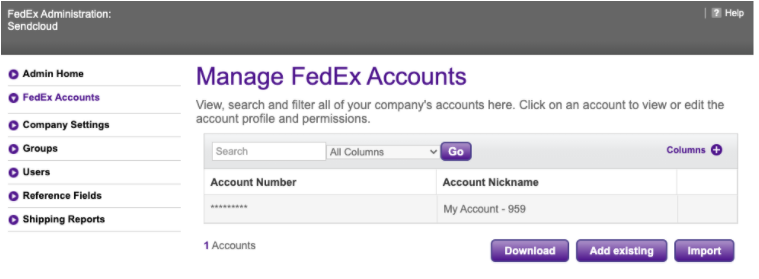
- Click FedEx Accounts and select the account you want to use to integrate with Returnless. You will see the below overview:
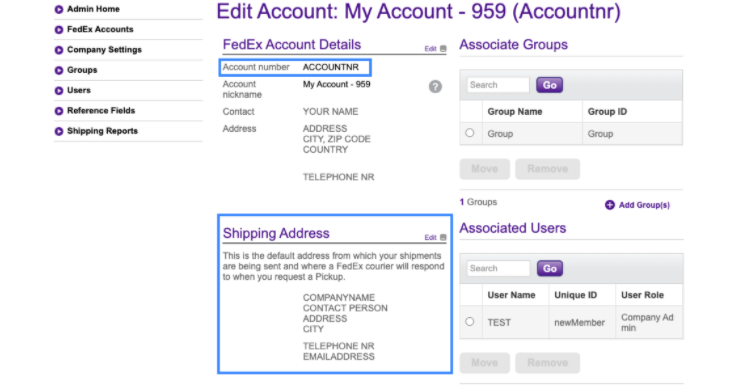
- Locate your Account number (shown above in blue) and enter this into the registration form.
- Next, add your shipping address details into the registration form, taking care that they are entered exactly as they appear in your FedEx account (shown above in blue).