Split return orders
The split returns feature allows you to separate a customer’s return into multiple shipments, based on the return address linked to each item. This is especially useful when working with multiple warehouses, suppliers, or fulfilment centers. By automatically splitting returns, consumers always send each item to the correct location.
If a consumer selects items with different return addresses, the system will prevent them from announcing these items in one return. The consumer will first complete the return order announcement for the items linked to the first return address. After finishing the first return order, they can start a second return order announcement for the remaining items.
In this article:
How to set it up
To start using split returns, you need to configure:
- Multiple return addresses
- One or more item level return rules
Return addresses
Split returns are determined at the return address level. You must create a separate return address for every destination where items can be shipped. To learn how to add or edit return addresses, see the Manage return addresses article.
Item level return rules
After your return addresses are set up, you can create item level return rules. These rules activate during the item selection phase of the return flow. In an item level return rule, you can use the Force return address action. This ensures that any item matching the rule’s conditions is always shipped to the specified return address.
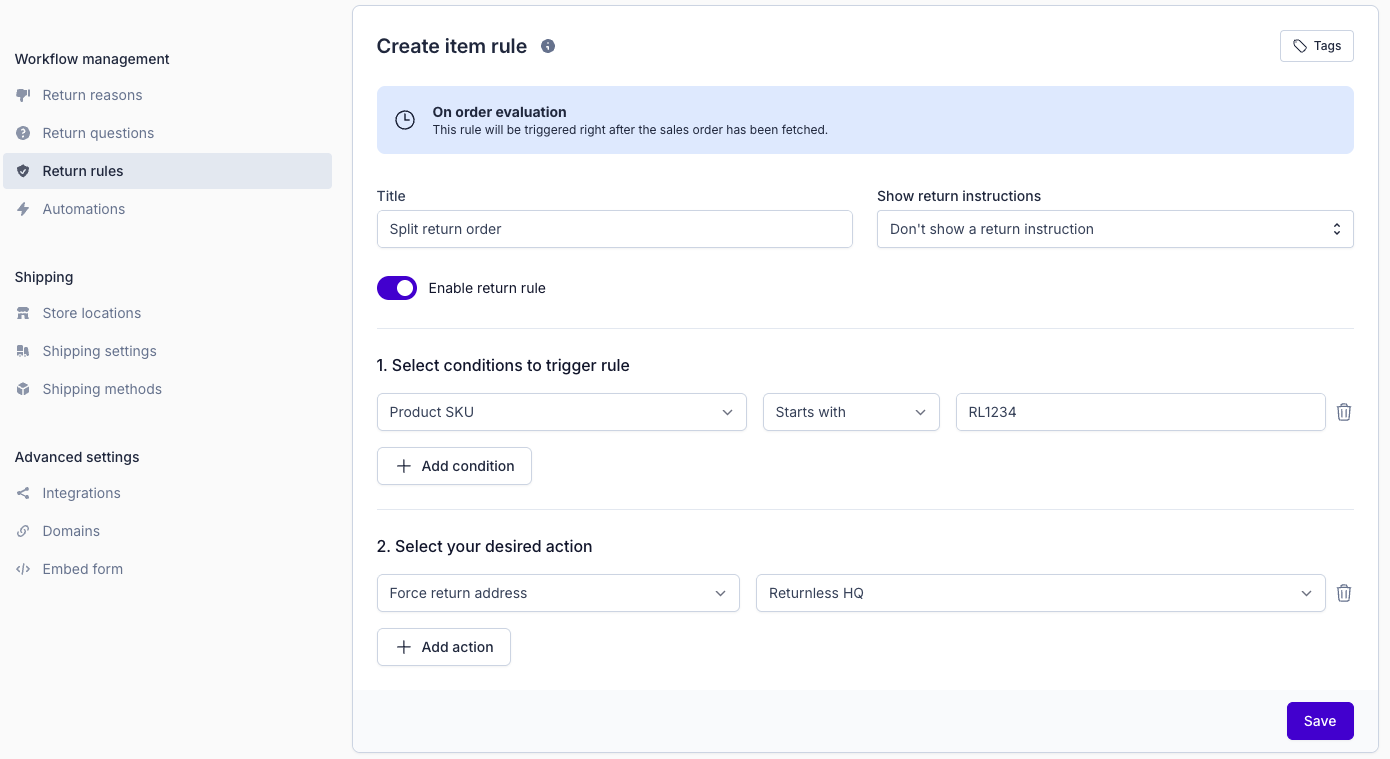
Because split returns occur during the item selection phase, item level rules cannot use return reasons as conditions. If you want to route returns based on the consumer’s chosen return reason, use a return level return rule instead.
For more information about setting up rules, refer to the Return rules page.
Conflicting return rules
A conflict can occur if:
- An item level return rule forces items to return address A, and
- A return level return rule assigns the entire return to address B
In this case, the system cannot determine which address should be used. When such a conflict happens, the return is automatically converted into a request. A clear notification is shown to inform your team about the conflicting rules. A team member can then manually choose the correct return address. Instructions for handling this can be found in the Processing a request article.