Open integration (API)
The Open Integration has been renewed in version 2025-02.
Support for version 2024-01 has ended. Please make sure you have upgraded to version 2025-02 or later. If you're unsure which version your integration is currently using, check your integration settings under Settings → Integrations
The Open Integration allows you to connect any custom platform to Returnless using a set of standardized API endpoints. This enables you to build a return form using order data from any system.
In this article:
- Features
- Installation
- Configuration
- Endpoints
- 1. Search Order Endpoint
- 2. Create Return Endpoint
- 3. Create Refund Endpoint
- 4. Create Coupon Endpoint
- 5. Create Gift Card Endpoint
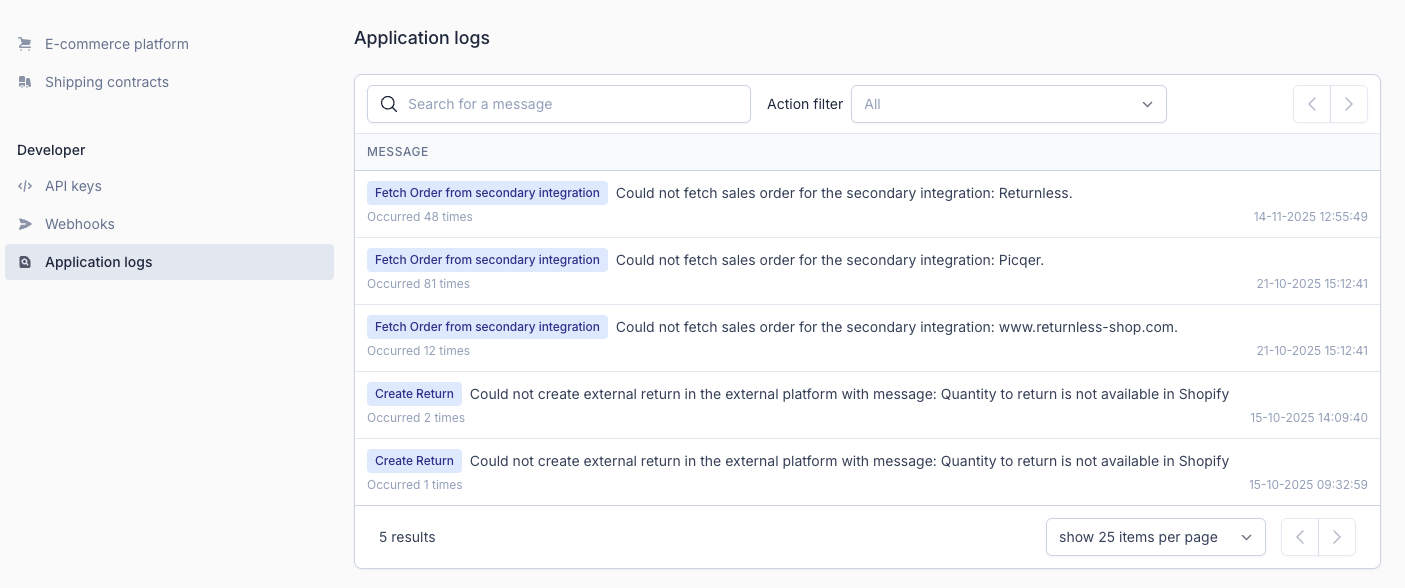
- Application Logs
Features
| Feature | Available |
|---|---|
| Search order | ✅ |
| Create coupon | ✅ |
| Create refund | ✅ |
| Create gift card | ✅ |
| Create return | ✅ |
| Return importer | ❌ |
Installation
To add a new Open Integration:
- Log in to your Returnless Panel.
- Navigate to Integrations.
- Click Add new Integration and select Open integration.
-
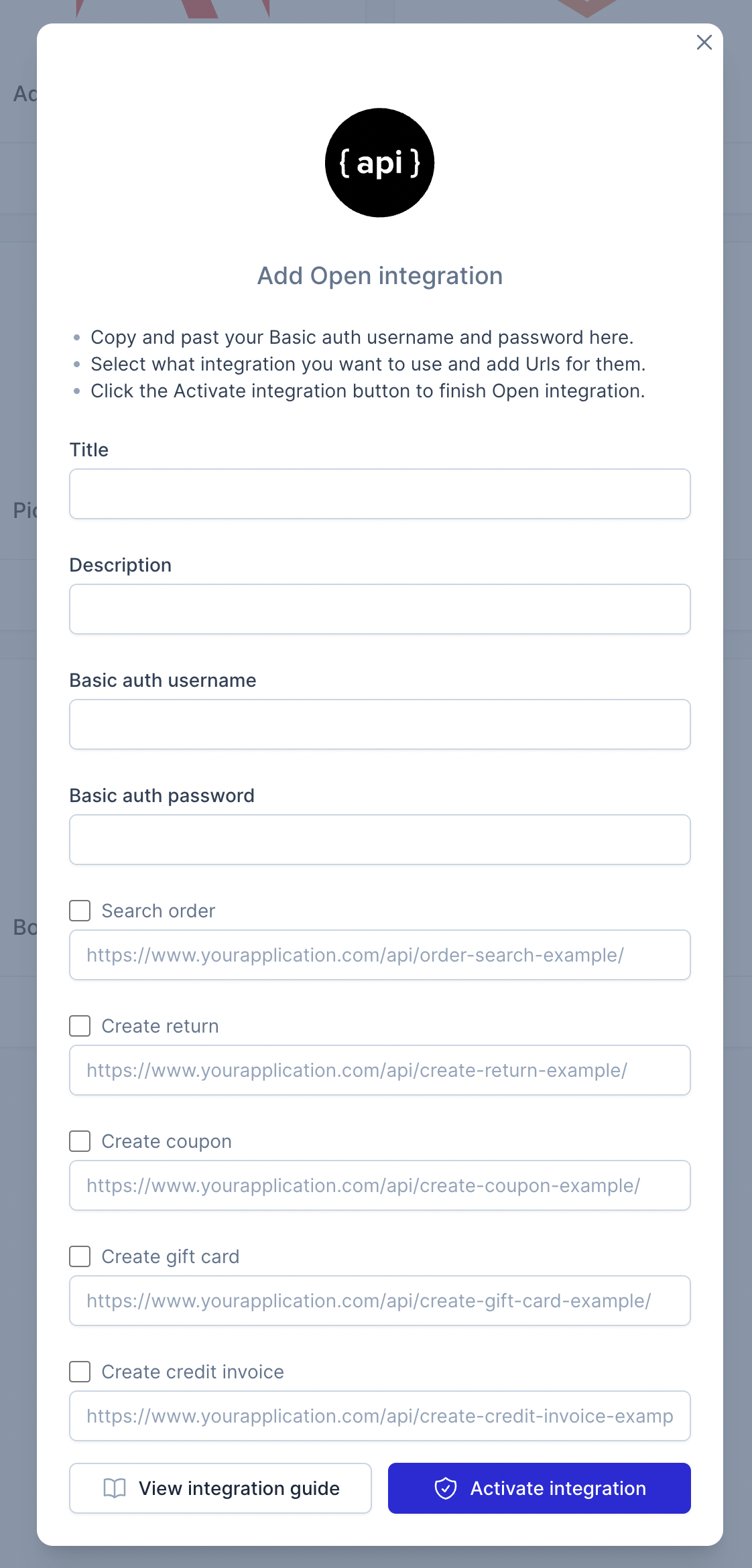
In the modal window, enter the relevant endpoint URLs for your integration.
Configuration
Configure the necessary fields inside the integration modal:
| Parameter | Description | Example |
|---|---|---|
| Description | Description of your integration. | Warehouse Management System order connector |
| Basic auth username / password | Recommended for securing your endpoints. These credentials will be sent with all GET and POST requests. | — |
| Search order endpoint | URL to fetch order details. | https://www.yourapplication.com/api/search-order |
| Create return endpoint | URL used to send return details to your platform. | https://www.yourapplication.com/api/create-return |
| Create coupon endpoint | URL for creating coupons in your system. | https://www.yourapplication.com/api/create-coupon |
| Create gift card endpoint | URL for creating gift cards in your system. | https://www.yourapplication.com/api/create-giftcard |
| Create refund endpoint | URL for creating refunds/credit invoices. | https://www.yourapplication.com/api/create-refund |
Note: When saving your integration, trailing slashes in endpoint URLs are removed automatically.
If your staging environment is protected by a firewall, please whitelist the Returnless IP address.
Endpoints
Below you will find the specifications for each endpoint in the Open Integration.
1. Search Order Endpoint
Request URL
When a consumer enters an order number in the return form, Returnless sends a GET or POST request to your configured endpoint:
?order_number=&validation_method=&validation_value=
Example:
https://www.yourapplication.com/api/search-order?order_number=ORD001&validation_method=email&validation_value=john@doe.com
Request Body (JSON)
| Attribute | Description |
|---|---|
| order_number | The order number entered by the customer. |
| validation_method | One of: postcode , email , customerId . |
| validation_value | The corresponding value as entered by the customer (string). |
Expected Response
In the reponse we expect the details of the sales order related to the order number. Please note that we will take care of all logic to verify if the order is placed by the applicable consumer. Order details will only be shown to the consumer once this validation has succeeded. We will verify the consumer by either the postcode or emailaddress.
Top-level fields
| Field | Type | Required | Description |
|---|---|---|---|
| order_date | string | required | Date the order was placed. |
| order_id | string | required | Internal ID of the order in your platform. |
| order_number | string | required | Public order number. |
| status | string | — | Status of the order. |
| platform_url | string | — | URL to view the order in your platform. |
| customer | object | required | Customer details (see customer object). |
| shipping | object | — | Shipping information. |
| payment | object | — | Payment information. |
| sales_order_items | array[object] | required | List of line items (see item object). |
Customer Object
| Field | Type | Required |
|---|---|---|
| name | string | — |
| string | required | |
| id | string | required |
| address | object | required |
| customer_groups | array[object] | — |
Address Object
| Field | Type | Required |
|---|---|---|
| city | string | — |
| country_code | string | — |
| house_number | string | — |
| postal_code | string | — |
| state | null | — |
| street | string | — |
| suffix | null | — |
| telephone | string | — |
Customer Groups Object
| Field | Type | Required |
|---|---|---|
| name | string | required |
| id | string | required |
Shipping Object
| Field | Type | Required |
|---|---|---|
| carrier | string | — |
| delivery_date | string | — |
| fulfilment_date | string | — |
| shipping_amount | integer | — |
| shipping_amount_vat | integer | — |
| tracking_number | string | — |
Payment Object
| Field | Type | Required |
|---|---|---|
| currency | string | — |
| discount_code | string | — |
| discount_description | string | — |
| payment_method | string | — |
Sales Order Item Object
| Field | Type | Required |
|---|---|---|
| product_id | string | required |
| name | string | required |
| sku | string | required |
| sales_order_item_id | string | required |
| quantity | integer | required |
| product_type | string |
— Allowed: |
| parent_product_id | string | — |
| barcode | string | — |
| brand | string | — |
| categories | array[string] | — |
| country_of_origin_code | string | — |
| height | integer | — |
| width | integer | — |
| length | integer | — |
| weight | integer | — |
| image_src | string | — |
| item_price | integer | — |
| item_price_vat | integer | — |
| item_cost | integer | — |
| item_discount | integer | — |
| row_discount | integer | — |
| vat_rate | integer | — |
| vat_code | string | — |
| extension_attributes | array[object] | — |
| meta_data | array[object] | — |
Extension Attributes Object
| Field | Type | Required |
|---|---|---|
| option | string | required |
| value | string | required |
Item Metadata Object
| Field | Type | Required |
|---|---|---|
| key | string | required |
| value | string | required |
Example response:
{
  "order_number": "ORD000123",
  "order_date": "2023-01-01T13:10:00+0000",
  "order_id": "5810921",
  "status": "Completed",
  "payment_method": "iDeal",
  "shipping_method": "PostNL Standard 0-23kg",
  "currency": "EUR",
  "shipping_amount": 492,
  "shipping_amount_vat": 103,
  "carrier": "PostNL",
  "tracking_number": "3S12341234",
  "delivery_date": "2023-01-03T11:15:00+0000",
  "discount_code": "SALE-001",
  "discount_description": "Sale coupon",
  "platform_url": "https://admin.webshop.com/orders/ORD1234",
  "meta_data": [
    {
      "key": "account-created-on",
      "value": "12-01-2024"
    },
    {
      "key": "follower-on-social",
      "value": "true"
    }
  ],
  "customer": {
    "customer_id": "123",
    "name": "Your Customer",
    "email": "your-customer@gmail.com",
    "address": {
      "country": "NL",
      "telephone": "+316123412345",
      "street": "Stadhuisplein",
      "house_number": "10",
      "suffix": "",
      "city": "Eindhoven",
      "postal_code": "5611EM",
      "state": "NB"
    }
  },
  "sales_order_items": [
    {
      "product_id": "123",
      "name": "T-shirt",
      "sku": "t-shirt-l-01",
      "quantity": 2,
      "sales_order_item_id": "85901",
      "model": "L",
      "barcode": "05189203189",
      "item_price": 2500,
      "item_discount": 500,
      "item_cost": 1000,
      "row_discount": 1000,
      "vat_rate": 21,
      "vat_code": "BTW 21%",
      "width": 500,
      "height": 10,
      "length": 600,
      "weight": 450,
      "image_src": "https://assets.travelshop.com/img/05189203189.jpg",
      "url": "https://www.travelshop.com/products/05189203189",
      "brand": "True Classics",
      "supplier": "Apparel Ltd.",
      "category": [
        "T-Shirts",
        "Sale"
      ],
      "extension_attributes": [
        {
          "option": "Size",
          "value": "XL"
        },
        {
          "option": "Color",
          "value": "Black"
        }
      ],
      "meta_data": [
        {
          "key": "collar-size",
          "value": "M"
        },
        {
          "key": "shirt-length",
          "value": "L"
        }
      ],
      "country_of_origin_id": "NL",
      "hs_code": "6109",
      "has_children": false,
      "parent_id": ""
    }
  ]
}
Bundle Product Support
To define bundles:
- Create the parent item:
product_type = bundle-
parent_product_id = nullCreate each child item:
product_type = simpleparent_product_id = {product_id_of_bundle}
Example:
2. Create Return Endpoint
Request URL
When an action is triggered to create a return in the Open platform integration, we will do a POST call to the given endpoint. The request we make will have the following structure:
<endpoint_url>
Example:
https://www.yourapplication.com/api/create-return
Create Return – Request Body Overview
The request body contains the following fields:
Top-level fields
| Field | Type | Description |
|---|---|---|
| order_id | string | Internal ID of the order in your platform. |
| return_id | string | Unique ID of the return in Returnless. |
| return_number | string | Public return number in Returnless. |
| returned_products | array[object] | List of returned product lines (see structure below). |
returned_products[] Object
Each returned item contains:
| Field | Type | Description |
|---|---|---|
| item_id | string | ID of the sales order item in your platform. |
| product_id | string | Product ID, identical to sales_order_items.product_id from the Search Order endpoint. |
| return_reason_id | string | System ID of the selected return reason. |
| return_reason | string | Name of the selected return reason. |
| return_type | string or null | Resolution type chosen (e.g., refund, coupon, repair). |
| quantity | integer | Quantity returned by the consumer. |
| quantity_received | integer | Quantity marked as received by the webshop. |
| quantity_back_in_stock | integer | Quantity eligible to be restocked. |
| sku | string | SKU or article code of the purchased product. |
Expected Request
{
  "order_id": "5810921",
  "return_id": "1004",
  "return_number": "RE2023-0001",
  "returned_products": [
    {
      "item_id": "85901",
      "product_id": "12.345",
      "return_reason_id": "reason_xVl90m7ZBp9ZVIkd23M3bA",
      "return_reason": "size-too-large",
      "return_type": "coupon",
      "quantity": 2,
      "quantity_received": 2,
      "quantity_back_in_stock": 1,
      "sku": "t-shirt-l-01"
    }
  ]
}
Expected Response
Optional, but recommended:
{
  "reference_id": "YOUR-RETURN-REFERENCE-ID",
}
3. Create Refund Endpoint
Request URL
When an action is triggered to create a refund (credit invoice) in the Open platform integration, we will do a POST call to the given endpoint. The request we make will have the following structure:
<endpoint_url>
Example:
https://www.yourapplication.com/api/create-refund
Create Refund - Request Body
The request body contains the following fields:
Top-level fields
| Field | Type | Description |
|---|---|---|
| order_id | string | Internal ID of the order in your platform. |
| return_id | string | Unique ID of the return in Returnless. |
| return_number | string | Public return number in Returnless. |
| returned_products | array[object] | List of returned product lines (see structure below). |
returned_products[] Object
Each returned item contains:
| Field | Type | Description |
|---|---|---|
| item_id | string | ID of the sales order item in your platform. |
| return_reason_id | string | System ID of the selected return reason. |
| return_reason | string | Name of the selected return reason. |
| return_type | string | Type of return. |
| quantity | integer | Quantity returned by the consumer. |
| quantity_received | integer | Quantity marked as received by the webshop. |
| quantity_back_in_stock | integer | Quantity eligible to be restocked. |
| depreciation | integer | Depreciation amount for this item (in cents). |
| sku | string | SKU or article code of the purchased product. |
Example:
{
  "order_id": "5810921",
  "return_id": "returnorder_Wo4ZgnBoEe9O3TdbWLApr2hX",
  "return_number": "RE2023-0001",
  "returned_products": [
    {
      "item_id": "85901",
      "return_reason_id": "reason_xVl90m7ZBp9ZVIkd23M3bA",
      "return_reason": "size-too-large",
      "return_type": "voucher",
      "quantity": "2",
      "quantity_received": "2",
      "quantity_back_in_stock": "1",
      "depreciation": 0,
      "sku": "t-shirt-l-01"
    }
  ]
}
Expected Response (required)
| Field | Description |
|---|---|
| invoice_id | ID of the credit invoice in your system |
| total_amount | Total refunded amount (in cents) |
Example:
{
  "invoice_id": "123",
  "total_amount": 2500
}
4. Create Coupon Endpoint
Request
When an action is triggered to create a coupon (voucher) in the Open platform integration, we will do a POST call to the given endpoint. The request we make will have the following structure:
<endpoint_url>
Example:
https://www.yourapplication.com/api/create-coupon
Create Coupon - Request Body
The request body contains the following fields:
Top-level fields
| Field | Type | Description |
|---|---|---|
| order_id | string | Internal ID of the order in your platform. |
| return_id | string | Unique ID of the return in Returnless. |
| return_number | string | Public return number in Returnless. |
| amount | integer | Total amount of the voucher to be created (in cents). |
Example:
{
  "order_id": "5810921",
  "return_id": "returnorder_Wo4ZgnBoEe9O3TdbWLApr2hX",
  "return_number": "RE2023-0001",
  "amount": 2500
}
Expected Response
We do not require any response. However, you can optionally give us a response containing the details of the created coupon. If we receive this response, the details will be saved in Returnless:
Example:
{
  "discount_code": "DISC0001",
  "amount": 2500
}
5. Create Gift Card Endpoint
Request
When an action is triggered to create a gift card in the Open platform integration, we will do a POST call to the given endpoint. The request we make will have the following structure:
<endpoint_url>
Example:
https://www.yourapplication.com/api/create-giftcard
Create gift card - Request Body Overview
The request body contains the following fields:
Top-level fields
| Field | Type | Description |
|---|---|---|
| order_id | string | Internal ID of the order in your platform. |
| return_id | string | Unique ID of the return in Returnless. |
| return_number | string | Public return number in Returnless. |
| amount | integer | Total amount of the voucher to be created (in cents). |
Example:
{
  "order_id": "5810921",
  "return_id": "1004",
  "return_number": "RE2023-0001",
  "amount": 2500
}
Expected Response
We do not require any response. However, you can optionally give us a response containing the details of the created gift card. If we receive this response, the details will be saved in Returnless.
{
  "giftcard_code": "GIFT0001",
  "amount": 2500
}
Suggested financial flow for handling gift cards
-
The consumer initiates a return for Order 1.
They select which items they are returning and choose a gift card as the refund method.
-
The returned items are received.
The merchant creates a gift card for the total refundable amount of Order 1.
This gift card is generated directly in the merchant’s own system.
-
To keep financial administration consistent, we recommend the following actions:
3a. Create a credit memo for Order 1.
This reverses the revenue in your accounting system and allows the returned items to be restocked.
3b. Record the gift card value in your bookkeeping.
The value of the issued gift card represents a liability: an outstanding value the consumer can still spend.
How this is recorded may vary depending on your accounting setup—consult your bookkeeper or accountant if needed.
In essence, this gift card functions the same as a gift card sold for occasions such as birthdays.
-
When the consumer places Order 2, the gift card is used as payment.
This is processed like any regular sale. The gift card simply acts as a payment method, similar to other payment options in your webshop.
Application Logs
If communication with your integration results in an error, Returnless automatically creates an Application Log entry.
These logs include:
- Which endpoint was called
- The return order involved
- Timestamp
- Request and response details
Access logs via:
Settings → Integrations → Application logs