About webhooks
Webhooks allow Returnless to notify your application when specific events occur in your Returnless panel.
They are especially helpful for asynchronous processes, such as when a new return is created or when a shipment is delivered.
In this article:
- Creating Webhooks
- How Webhook Requests Work
- Webhook Retries
- Webhook Body
- Webhook Headers
- Example Webhook
- Supported events
Creating Webhooks
To add a new webhook:
- Log in to your Returnless panel.
- Navigate to Integrations.
-
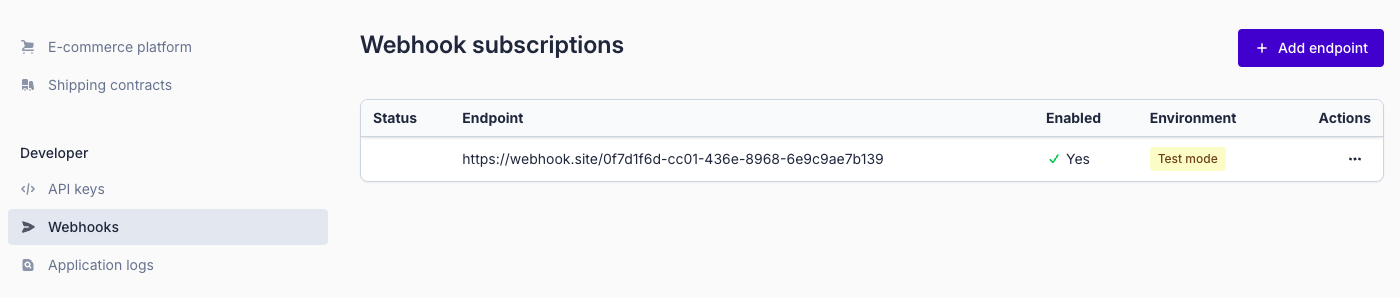
Open the Webhooks tab.
-
Click Add endpoint to configure your webhook.
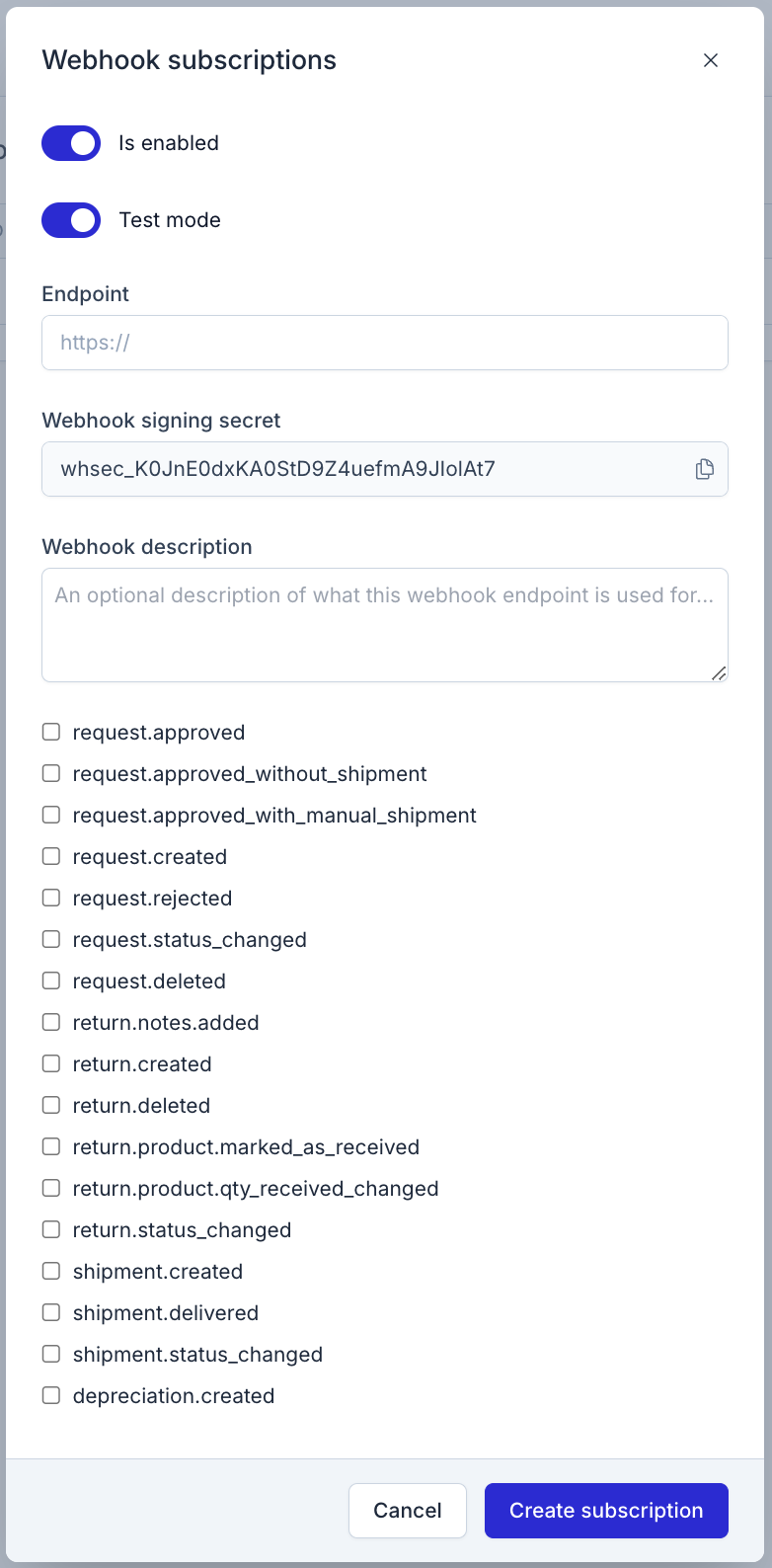
In the modal, you can set the following parameters:
| Parameter | Description |
|---|---|
| Is enabled | Enables or disables the webhook. |
| Test mode | When enabled, only events from return forms in test mode will be sent. When disabled, only events from live return forms will be sent. |
| Endpoint | The URL where the webhook request will be delivered. |
| Webhook Signing Secret | Secret key used to verify webhook signatures. See Signing Requests. |
| Webhook description | Internal description so you can easily identify what the webhook is used for. |
| Events | Select which Returnless events should trigger this webhook. |
How Webhook Requests Work
Whenever a selected event occurs, Returnless sends a POST request to your webhook endpoint.
Tip: To easily inspect webhook data during development, use a testing tool such as webhook.site.
Webhook Retries
A webhook is considered successful when your endpoint returns a 2XX HTTP status code.
If the response is not 2XX:
-
The webhook is retried up to 10 times.
Retries use an exponential backoff strategy over a 15-hour period.
If all retries fail:
- A notification email is sent.
- The event is marked as failed.
- No further retries occur.
Automatic Webhook Disabling
24 hours after a failure notification email is sent:
- If 5 or more events are currently marked as failed, the webhook will be automatically disabled.
- If you fix the issue before this evaluation point, the failed count resets and the webhook remains active.
Re-enabling a Webhook
You can re-enable the webhook at any time:
- Go to Settings → Integrations → Webhooks.
- Edit the webhook.
- Set Enabled to true.
This resets the failed events counter.
Webhook Body
Webhook requests contain a JSON:API resource object representing the event data.
For example, return events include a return resource with all related data (customer, shipments, notes, etc.).
Webhook Headers
All webhook requests include the following headers:
| Header | Description |
|---|---|
| Content-Type: application/json | Indicates JSON payload. |
| X-Event-Name | Name of the event that triggered the webhook. |
| X-Signature | Signature used to verify the webhook payload. See Signing Requests. |
If the webhook uses HTTPS, the SSL certificate of the endpoint is validated before sending the request.
Example Webhook
Headers:
Content-Type: application/json
X-Event-Name: return.created
X-Signature: {signature}
Body:
{
  "data": {
    "id": "return_12vM04vDdaQQJHxWprprL0IX",
    "resource_type": "string",
    "order_date": "2019-08-24T14:15:22Z",
    "quantity": 0,
    "return_number": "string",
    "state": "string",
    "status": {
      "color": "string",
      "label": "string"
    },
    "value": {
      "amount": 0,
      "unit": "string",
      "label": "string"
    },
    "total_amounts": {
      "currency": "string",
      "discount": 0,
      "discount_tax": 0,
      "shipping": 0,
      "shipping_tax": 0,
      "total": 0,
      "total_tax": 0
    },
    "created_at": "2019-08-24T14:15:22Z",
    "includes": {
      "customer": {
        "id": "customer_lXeXppX4KeLO0cN3Q3kAgN",
        "name": "string",
        "email": "string",
        "includes": {
          "addresses": [
            {
              "id": "customeraddress_lXeXppX4KeLO0cN3Q3kAgN",
              "city": "string",
              "coordinates": {
                "latitude": "string",
                "longitude": "string"
              },
              "country": {
                "id": "country_lXeXppX4KeLO0cN3Q3kAgN",
                "name": "string",
                "iso_code": "string"
              },
              "house_number": "string",
              "postal_code": "string",
              "state": "string",
              "street": "string",
              "telephone": "string",
              "links": {
                "api": "string"
              }
            }
          ]
        },
        "links": {
          "api": "string"
        }
      },
      "customer_address": {
        "id": "customeraddress_lXeXppX4KeLO0cN3Q3kAgN",
        "city": "string",
        "coordinates": {
          "latitude": "string",
          "longitude": "string"
        },
        "country": {
          "id": "country_lXeXppX4KeLO0cN3Q3kAgN",
          "name": "string",
          "iso_code": "string"
        },
        "house_number": "string",
        "postal_code": "string",
        "state": "string",
        "street": "string",
        "telephone": "string",
        "links": {
          "api": "string"
        }
      },
      "notes": [
        {
          "id": "note_12vM04vDdaQQJHxWprprL0IX",
          "note": "string",
          "created_at": "2019-08-24T14:15:22Z"
        }
      ],
      "shipments": [
        {
          "id": "shipment_12vM04vDdaQQJHxWprprL0IX",
          "tracking_number": "string",
          "status": {
            "color": "string",
            "label": "string"
          },
          "includes": {
            "customer_address": {
              "id": "customeraddress_lXeXppX4KeLO0cN3Q3kAgN",
              "city": "string",
              "coordinates": {
                "latitude": "string",
                "longitude": "string"
              },
              "country": {
                "id": "country_lXeXppX4KeLO0cN3Q3kAgN",
                "name": "string",
                "iso_code": "string"
              },
              "house_number": "string",
              "postal_code": "string",
              "state": "string",
              "street": "string",
              "telephone": "string",
              "links": {
                "api": "string"
              }
            },
            "return_address": {
              "id": "address_12vM04vDdaQQJHxWprprL0IX",
              "name": "string",
              "company_name": "string",
              "telephone": "string",
              "street": "string",
              "house_number": "string",
              "suffix": "string",
              "postal_code": "string",
              "city": "string",
              "state": "string",
              "coordinates": {
                "latitude": "string",
                "longitude": "string"
              },
              "country": {
                "id": "country_lXeXppX4KeLO0cN3Q3kAgN",
                "name": "string",
                "iso_code": "string"
              },
              "is_primary": true,
              "created_at": "2019-08-24T14:15:22Z",
              "links": {
                "panel": "string",
                "api": "string"
              }
            }
          }
        }
      ]
    },
    "links": {
      "panel": "string",
      "api": "string"
    }
  }
}
Supported events
This is the full list of webhook events available in Returnless:
- request.approved_with_manual_shipment
- request.approved_without_shipment
- request.approved
- request.created
- return.created
- return.notes.added
- request.rejected
- request.status_changed
- request.deleted
- return.deleted
- return.product.qty_received_changed
- return.product.marked_as_received
- return.status_changed
- shipment.created
- depreciation.created
- shipment.delivered
- shipment.status_changed